Section
Lesson
Lesson
Lesson
Lesson
Lesson
Section
Lesson
Lesson
Lesson
Lesson
Lesson
Section 1
Lesson 1
Lesson 2
Lesson 3
Lesson 4
Lesson 5
Lesson 6
Lesson 7
Lesson 8
Lesson 9
Lesson 10 Lesson 11 Lesson 12
Lesson 13
Lesson 14
Lesson 15
Lesson 16
Section 3
Lesson 17
Lesson 18
Lesson 19
Lesson 20
Lesson 21
Lesson 22
Lesson 23
Lesson 24
Section 3
Lesson 25
Lesson 26
Lesson 27
Lesson 28
Lesson 29
Lesson 30
Lesson 31
Lesson 32
Lesson 33
Lesson 34
Lesson 35
Section 4
Lesson 36
Lesson 37
Lesson 38
Lesson 39
Chapter 1 is currently under production.
Chapters 2 and 3 are ready.
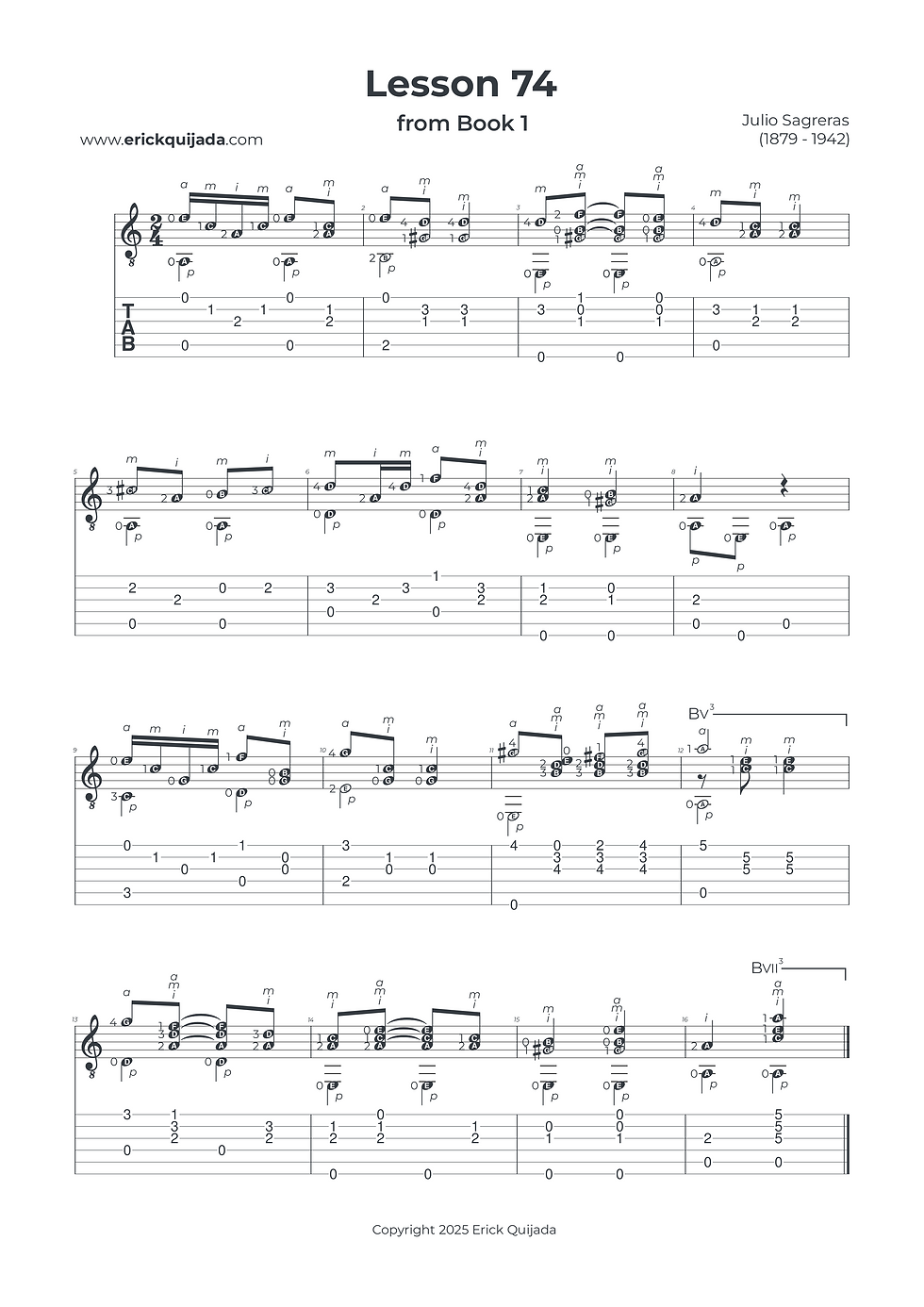
Lesson 74 | Metric Integration & Syncopated Phrasing
Advance your rhythmic fluency by navigating three distinct metric values while mastering the preparation of mid-fret half-barre positions.


Studio Insights
The Metric Milestone (Measure 6)
This lesson introduces a critical rhythmic hurdle: the integration of three distinct metric values within the melody. Pay special attention to Measure 6, Beat 1. This specific combination is a fundamental "novelty" in your training, yet it is a cornerstone of standard musical vocabulary. Mastering the transition between these durations is indispensable for any developing musician aiming for a sophisticated and reliable sense of time.
Architecture of the Hand
Keep your fingers curved and your tips as close to the strings as possible. Aim for "Minimalist Motion"—the smaller and more relaxed your finger movements, the more clarity you will achieve at higher tempos.
The Pre-Emptive Half-Barre
Technical efficiency is often found in the "micro-moments" before a difficult change. In Measure 12, you encounter a half-barre. Rather than jumping into it on the downbeat, utilize "Pre-Emptive Preparation": begin forming the half-barre on the final eighth note of Measure 11. This practice eliminates last-second tension and ensures a seamless harmonic transition.
The Play along
I've found that at the begining of the learning journey it can be very helpful to have a recording to follow along. Remember that you can easily change YouTube video playback speed on any device by clicking the settings gear icon, selecting Playback speed, and choosing a different speed from the menu, or even setting a custom speed.