Section
Lesson
Lesson
Lesson
Lesson
Lesson
Section
Lesson
Lesson
Lesson
Lesson
Lesson
Section 1
Lesson 1
Lesson 2
Lesson 3
Lesson 4
Lesson 5
Lesson 6
Lesson 7
Lesson 8
Lesson 9
Lesson 10 Lesson 11 Lesson 12
Lesson 13
Lesson 14
Lesson 15
Lesson 16
Section 3
Lesson 17
Lesson 18
Lesson 19
Lesson 20
Lesson 21
Lesson 22
Lesson 23
Lesson 24
Section 3
Lesson 25
Lesson 26
Lesson 27
Lesson 28
Lesson 29
Lesson 30
Lesson 31
Lesson 32
Lesson 33
Lesson 34
Lesson 35
Section 4
Lesson 36
Lesson 37
Lesson 38
Lesson 39
Chapter 1 is currently under production.
Chapters 2 and 3 are ready.
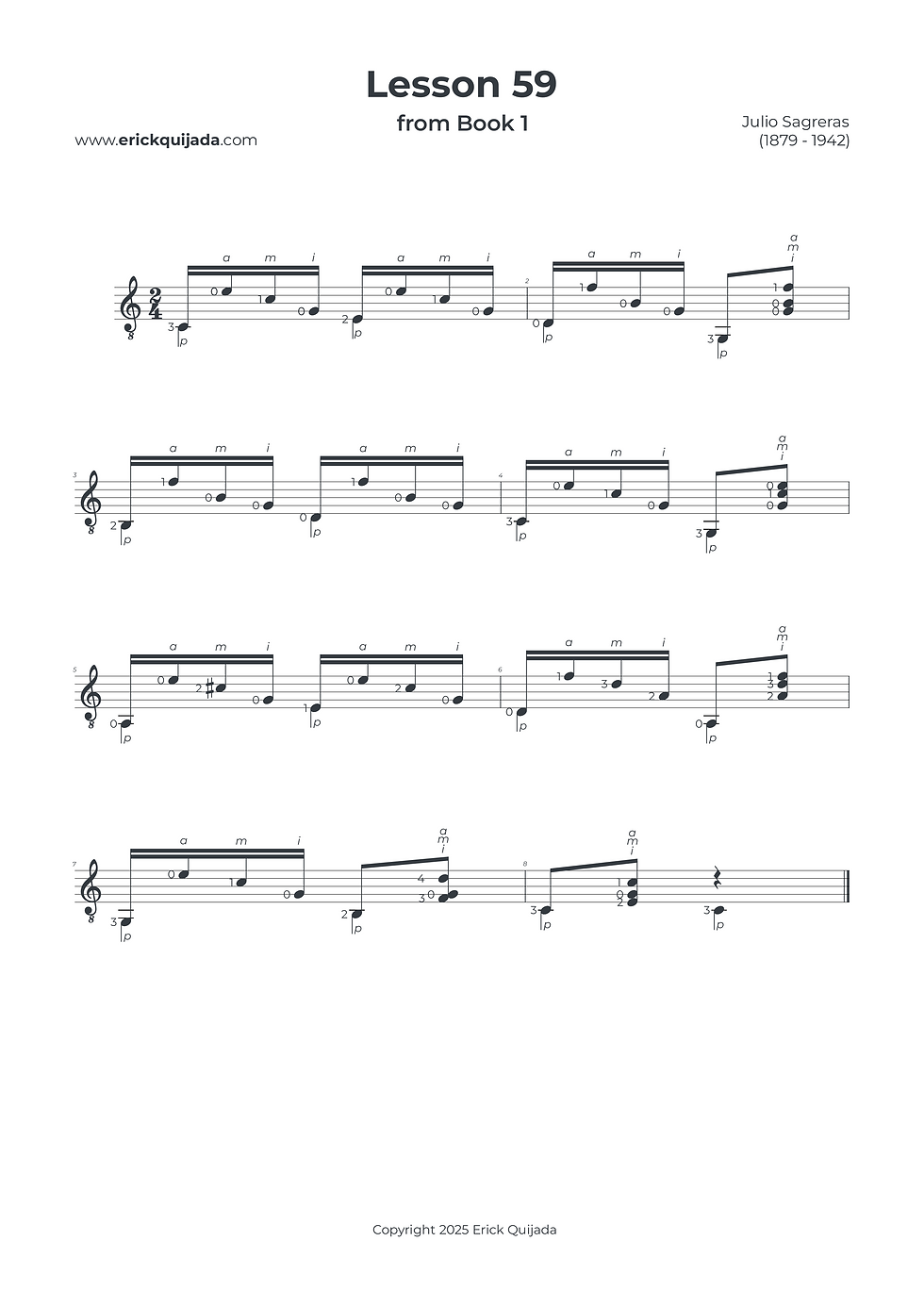
Lesson 59 | Pattern Chaining & Speed Foundations
Develop right-hand dexterity by navigating a complex "cell" structure, transitioning from linear arpeggios (p-a-m-i) to simultaneous strikes (p-ima).


Studio Insights
The Chained Cell Engine
This lesson is built on two distinct rhythmic cells: p-a-m-i and p-ima. By chaining these together (three loops of Cell 1 into Cell 2), we create a high-level blueprint for technical agility. While this piece serves as an excellent training field for speed, your primary objective is precision. Play as slowly as necessary to maintain a nuanced and balanced tone across every cell.
Melodic Legato & Separation
Focus on keeping the main melody clear and connected (legato). A key part of professional mastery is ensuring that notes do not overlap unnecessarily, which can muddy the melodic foundation. Aim for a "singing" quality where each melodic note is distinct yet flows seamlessly into the next.
Active Pressure Management
Efficiency in the left hand often comes down to knowing when not to press. For example, in measure 1, finger 3 must release pressure as soon as the e4 note on beat two is activated. By mastering this "release" habit in the plaing of melodies, you prevent finger fatigue and engineer a cleaner sound.
The Play along
I've found that at the begining of the learning journey it can be very helpful to have a recording to follow along. Remember that you can easily change YouTube video playback speed on any device by clicking the settings gear icon, selecting Playback speed, and choosing a different speed from the menu, or even setting a custom speed.