Section
Lesson
Lesson
Lesson
Lesson
Lesson
Section
Lesson
Lesson
Lesson
Lesson
Lesson
Section 1
Lesson 1
Lesson 2
Lesson 3
Lesson 4
Lesson 5
Lesson 6
Lesson 7
Lesson 8
Lesson 9
Lesson 10 Lesson 11 Lesson 12
Lesson 13
Lesson 14
Lesson 15
Lesson 16
Section 3
Lesson 17
Lesson 18
Lesson 19
Lesson 20
Lesson 21
Lesson 22
Lesson 23
Lesson 24
Section 3
Lesson 25
Lesson 26
Lesson 27
Lesson 28
Lesson 29
Lesson 30
Lesson 31
Lesson 32
Lesson 33
Lesson 34
Lesson 35
Section 4
Lesson 36
Lesson 37
Lesson 38
Lesson 39
Chapter 1 is currently under production.
Chapters 2 and 3 are ready.
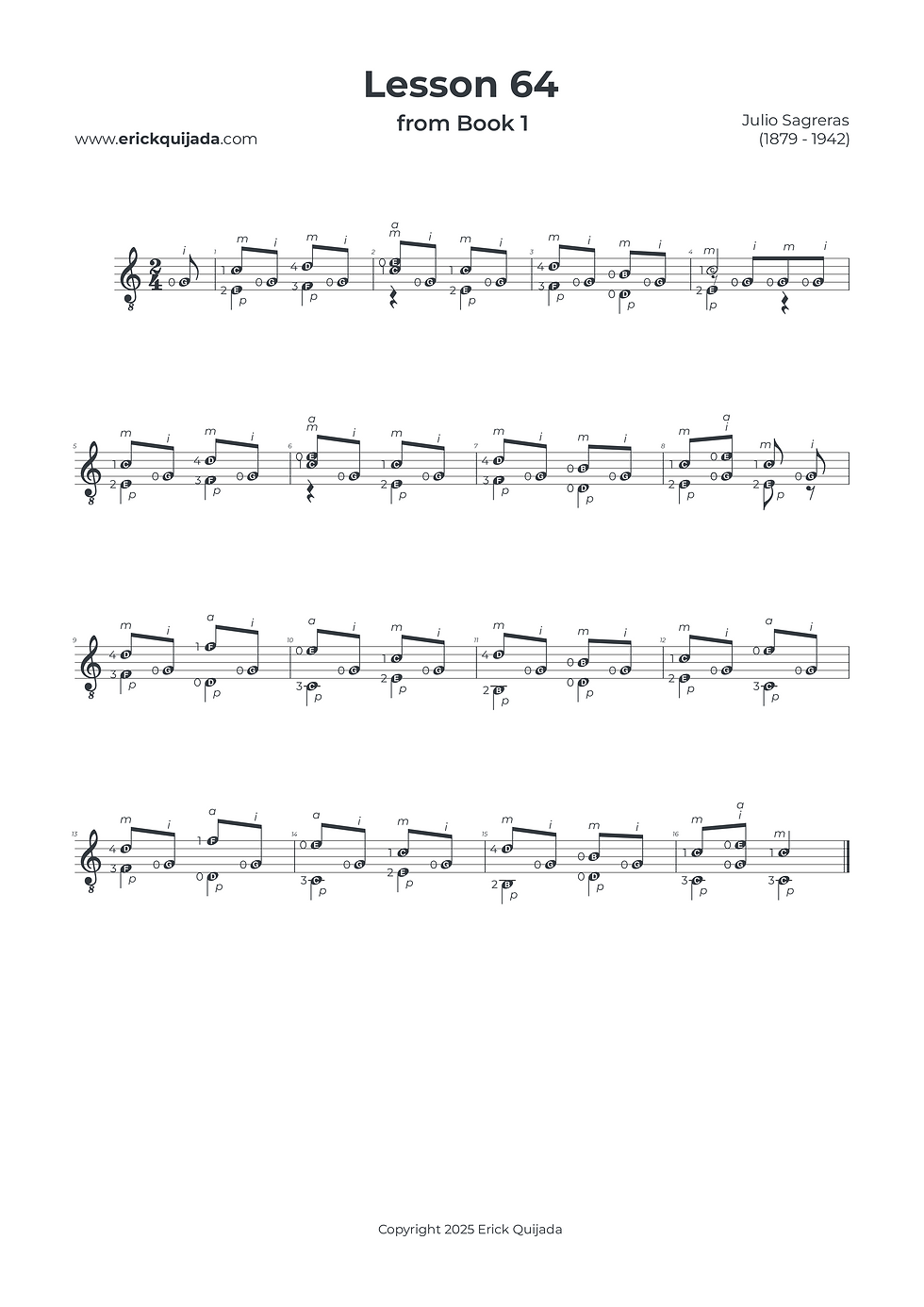
Lesson 64 | Parallel 6ths & Metric Momentum
Master the "melodic fabric" of parallel 6th and 10th intervals while maintaining a consistent rhythmic pulse on the open third string.


Studio Insights
The Synchronicity Standard
In this lesson, your left-hand efficiency depends on perfect synchronicity. At the beginning of every beat, aim to have both fingers land on their respective strings at the exact same moment. This simultaneous "strike" ensures a clean, professional architecture for the harmony and prevents the "staggered" sound that often occurs with complex intervals like 6ths and 10ths.
The Double-Hover Technique
To navigate the shifting positions of this piece, utilize "Double-Hovering." For example, when moving from beat 1 to beat 2 in measure 1, prepare fingers 3 and 4 by hovering them directly over their targets before they need to press. This proactive practice minimizes the friction of the shift and allows the parallel intervals to flow with total symmetry.
The Anacrusis Drive
This piece relies on an "anacrusis sensation"—the feeling of the upbeat driving toward the downbeat. The right hand supports this by plucking the open 3rd string with the index finger (i) on every upbeat. This constant pulse serves as the "heartbeat" of the music; keep it light but steady to provide the necessary momentum for the melodic line carried by the pm and pa combinations.
The Play along
I've found that at the begining of the learning journey it can be very helpful to have a recording to follow along. Remember that you can easily change YouTube video playback speed on any device by clicking the settings gear icon, selecting Playback speed, and choosing a different speed from the menu, or even setting a custom speed.