Section
Lesson
Lesson
Lesson
Lesson
Lesson
Section
Lesson
Lesson
Lesson
Lesson
Lesson
Section 1
Lesson 1
Lesson 2
Lesson 3
Lesson 4
Lesson 5
Lesson 6
Lesson 7
Lesson 8
Lesson 9
Lesson 10 Lesson 11 Lesson 12
Lesson 13
Lesson 14
Lesson 15
Lesson 16
Section 3
Lesson 17
Lesson 18
Lesson 19
Lesson 20
Lesson 21
Lesson 22
Lesson 23
Lesson 24
Section 3
Lesson 25
Lesson 26
Lesson 27
Lesson 28
Lesson 29
Lesson 30
Lesson 31
Lesson 32
Lesson 33
Lesson 34
Lesson 35
Section 4
Lesson 36
Lesson 37
Lesson 38
Lesson 39
Chapter 1 is currently under production.
Chapters 2 and 3 are ready.
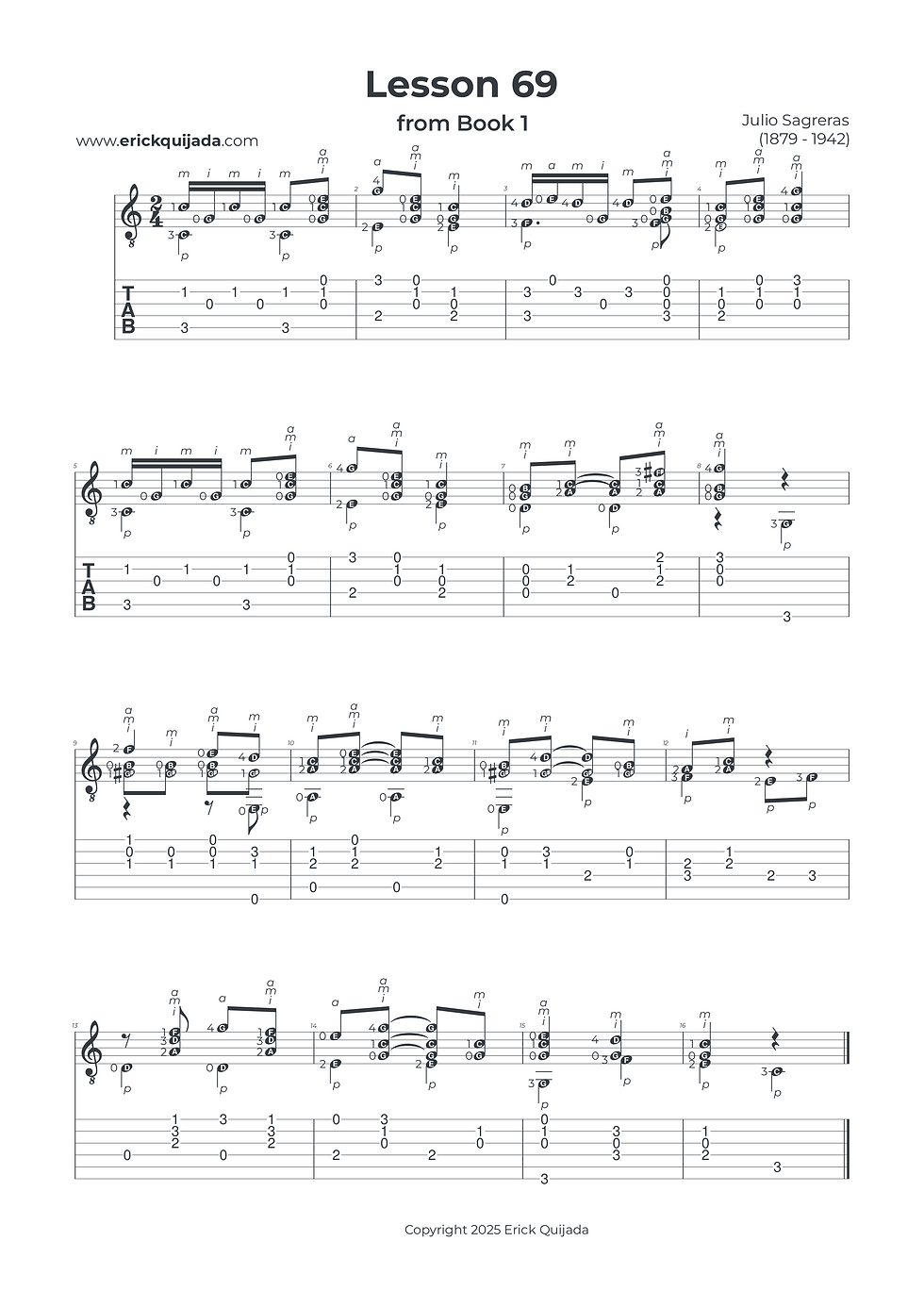
Lesson 69 | Rhythmic Syncopation & Finger Agility
Navigate the intricate "off-beat" melodies of syncopation while building the rapid-fire stamina of your middle and ring fingers.


Studio Insights
The Syncopation Challenge
This lesson features a primary melody on the top voice and a secondary melody in the bass, often displaced by syncopation. To maintain clarity, you must be explicitly aware of which fingers are carrying the melodic weight. The ring (a) and middle (m) fingers are particularly active here, plucking up to five successive notes. Focus on the precision of each strike to ensure the "off-beat" accents drive the music forward without sounding rushed.
The Multi-Finger Pivot
In the transition to measure 2, you can utilize a sophisticated assisting pivot. Maintain pressure with fingers 1 and 3 while simultaneously moving fingers 2 and 4 to their new positions (string 2, fret 2 and string 2, fret 3). This anchor stabilizes the hand and creates a seamless bridge between shapes, reducing mechanical friction and allowing the dual melodies to ring out with total symmetry. Release fingers 1 and 3 as soon as the notes in measure 2 begin to sound.
Long-Range Hover Preparation
Preparation is the your friend. From the very first note of the piece, keep finger 4 hovering over the 1st string (fret 3). By maintaining this "Ready State," you engineer an effortless transition from measure 1 to measure 2. Always look for these "hovering" opportunities to minimize wasted motion and keep your tips close to the strings.
The Play along
I've found that at the begining of the learning journey it can be very helpful to have a recording to follow along. Remember that you can easily change YouTube video playback speed on any device by clicking the settings gear icon, selecting Playback speed, and choosing a different speed from the menu, or even setting a custom speed.