Section
Lesson
Lesson
Lesson
Lesson
Lesson
Section
Lesson
Lesson
Lesson
Lesson
Lesson
Section 1
Lesson 1
Lesson 2
Lesson 3
Lesson 4
Lesson 5
Lesson 6
Lesson 7
Lesson 8
Lesson 9
Lesson 10 Lesson 11 Lesson 12
Lesson 13
Lesson 14
Lesson 15
Lesson 16
Section 3
Lesson 17
Lesson 18
Lesson 19
Lesson 20
Lesson 21
Lesson 22
Lesson 23
Lesson 24
Section 3
Lesson 25
Lesson 26
Lesson 27
Lesson 28
Lesson 29
Lesson 30
Lesson 31
Lesson 32
Lesson 33
Lesson 34
Lesson 35
Section 4
Lesson 36
Lesson 37
Lesson 38
Lesson 39
Chapter 1 is currently under production.
Chapters 2 and 3 are ready.
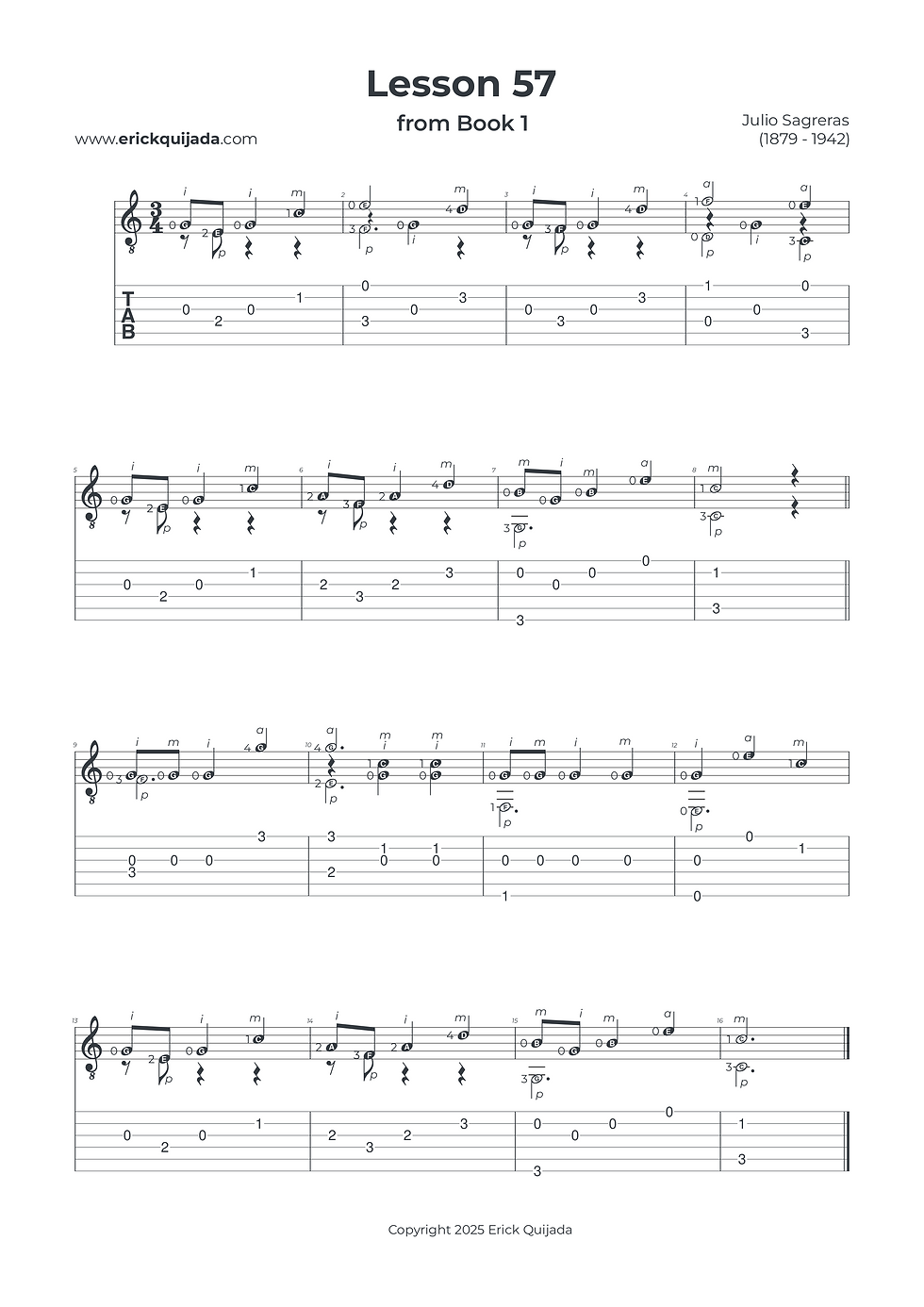
Lesson 57 | Cognitive Coordination & Technique Review
Challenge your technical flexibility by synthesizing multiple right-hand patterns—from simultaneous plucking to i-m alternation—into a single, cohesive musical statement.


Studio Insights
The Pattern Switching Habit
The true threshold of this lesson is mental agility. You will shift between i-m alternation on a single string and simultaneous pa / im plucking. Focus on the precision of each transition; your brain must "load" the next right-hand blueprint a beat before it happens to avoid any rhythmic friction.
The Universal Hover Strategy
In almost every measure of this piece, there is an opportunity to utilize "hovering fingers." Take the time to audit your left hand: ensure your tips are in a "Ready State" directly over their target frets before the strike. This practice of early preparation is the foundation of the fluid, professional sound we are engineering.
Sub-Position Flow & Symmetry
While the left-hand shapes are relatively simple (mostly one and two-finger positions), the complexity lies in their synchronization with the right hand. Use the "Sub-Position" technique to break down the "full" shapes. By keeping both hands curved and the tips close to the strings, you maintain the symmetry needed for the varying speeds of the plucking combinations.
The Play along
I've found that at the begining of the learning journey it can be very helpful to have a recording to follow along. Remember that you can easily change YouTube video playback speed on any device by clicking the settings gear icon, selecting Playback speed, and choosing a different speed from the menu, or even setting a custom speed.