Section
Lesson
Lesson
Lesson
Lesson
Lesson
Section
Lesson
Lesson
Lesson
Lesson
Lesson
Section 1
Lesson 1
Lesson 2
Lesson 3
Lesson 4
Lesson 5
Lesson 6
Lesson 7
Lesson 8
Lesson 9
Lesson 10 Lesson 11 Lesson 12
Lesson 13
Lesson 14
Lesson 15
Lesson 16
Section 3
Lesson 17
Lesson 18
Lesson 19
Lesson 20
Lesson 21
Lesson 22
Lesson 23
Lesson 24
Section 3
Lesson 25
Lesson 26
Lesson 27
Lesson 28
Lesson 29
Lesson 30
Lesson 31
Lesson 32
Lesson 33
Lesson 34
Lesson 35
Section 4
Lesson 36
Lesson 37
Lesson 38
Lesson 39
Chapter 1 is currently under production.
Chapters 2 and 3 are ready.
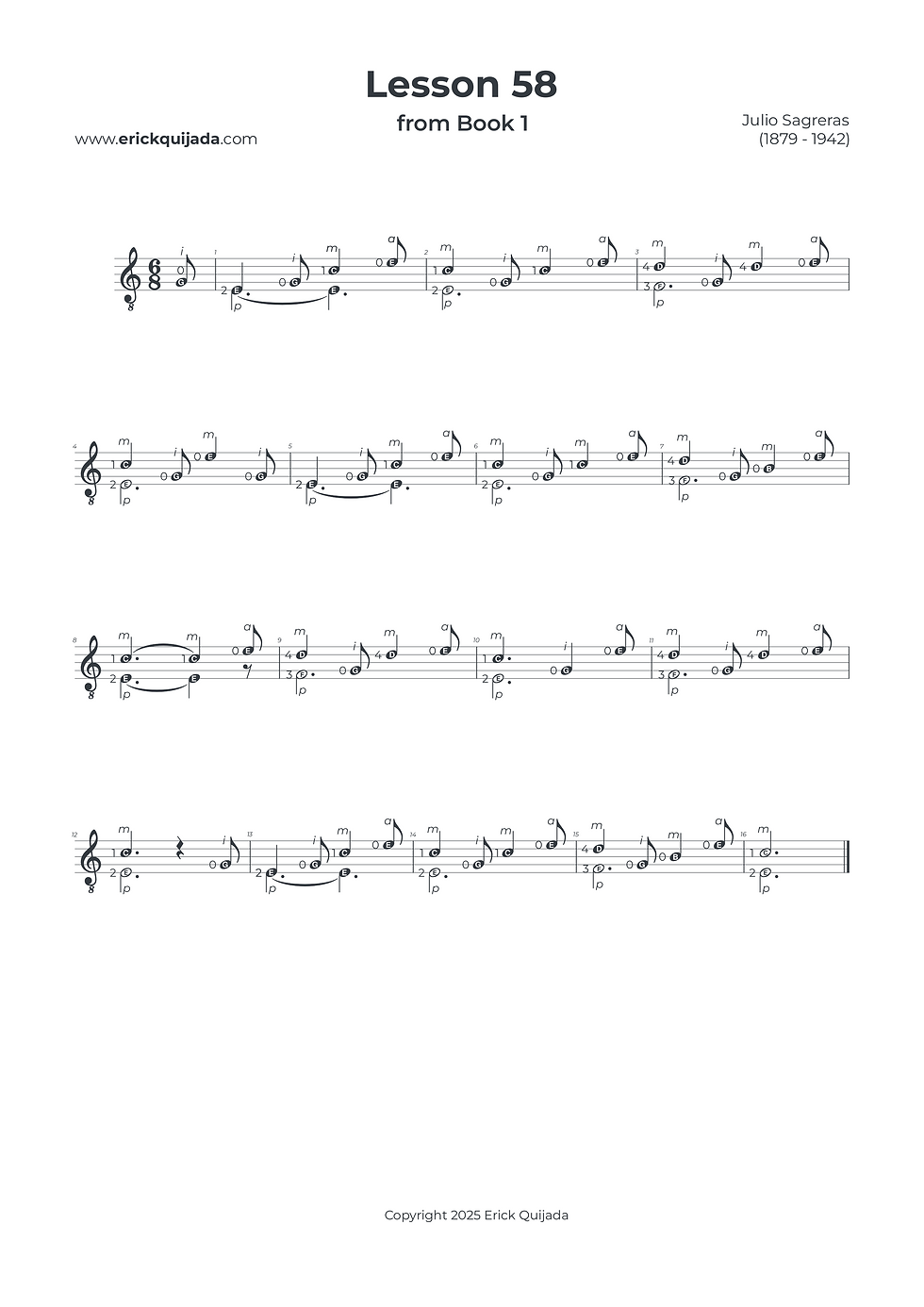
Lesson 58 | Pickup Measures & Melodic Anchors
Master the art of the anacrusis (pickup measure) while refining your polyphonic clarity through the strategic use of shadow-fixed melodic anchors.


Studio Insights
The Anacrusis Pulse
This lesson begins on a pickup beat, requiring you to internalize the rhythmic flow before the first full measure begins. This "breath" before the downbeat is a vital musical blueprint. Focus on the precision of the entry to ensure the rest of the piece maintains a professional and steady metric pulse.necessary lifting and landing, ensuring a more fluid and nuanced melodic line.
Shadow-Fixed Melodic Anchors
To clarify the melodic line, utilize "Shadow Fixing"—holding specific left-hand fingers in place even when they aren't actively pressing. This practice ensures the resonance of the melody remains unbroken. Combine this with the habit of hovering your unused fingers close to their next target to eliminate mechanical friction and maintain a high-end, boutique sustain.
Strategic Sub-Positioning
To streamline your left-hand movement, utilize "Shadow Fixing." This involves keeping a finger in its place on the string but releasing the pressure once the note has sounded. By staying in contact with the string when a note is destined to return quickly, you eliminate the friction of unnecessary lifting and landing, ensuring a more fluid and nuanced melodic line.
The Play along
I've found that at the begining of the learning journey it can be very helpful to have a recording to follow along. Remember that you can easily change YouTube video playback speed on any device by clicking the settings gear icon, selecting Playback speed, and choosing a different speed from the menu, or even setting a custom speed.